Edit Build.prop File on any Android with Root Access
I have always been that person who opens Android settings and thinks, hmm, what else can I tweak here 👀📱
Android just invites curiosity. It is open, flexible, and low key encourages you to poke around. Sometimes that curiosity leads you straight to a mysterious file called build.prop.
If you have ever Googled Android tweaks at 2am, you have definitely seen it mentioned. So yeah, let me break it down in plain human language, no tech bro vibes.
What is build.prop?
Android, at its core, is built on Linux. Touch gestures, swipes, taps, pinches, the whole smooth glass experience we live on daily. Under all that, there are system properties quietly deciding how your phone behaves.
That is where build.prop comes in.
The build.prop file is a system file that exists on every Android device. It lives at /system/build.prop
Inside it, there are tons of tiny name and value pairs. Stuff like device model, Android version flags, performance related settings, and other behind the scenes behaviour. All these properties get loaded when your phone boots up. Basically, your phone reads this file at startup and goes, sweet, this is who I am today.
Now here is the important bit.
You can read system properties without root access. You cannot modify them without root. No shortcuts, no jugaad, no Aussie mate tricks here 😅
Without root, you are mostly in read only territory. You can check values using apps or ADB commands and satisfy your curiosity. It is still useful if you want to understand your device better or debug something.
Prerequisites
Editing build.prop for real, though, needs root. There is a way to edit build.prop without root but that’s a story for another day.
When your device is rooted, editing build.prop becomes surprisingly simple. Not scary hacker movie stuff. Just an app and a bit of common sense.
What I usually do is grab a BuildProp Editor app straight from Phoneky (Because Google Play Store deleted that). Nothing shady, no random APKs from sketchy forums. Keep it clean.
Before touching anything, I always back up my device. Always. I know it sounds boring, but one wrong line in build.prop and your phone can bootloop harder than your brain on no sleep. Backup is non negotiable, bro 🤝
What to do?
Once the app is installed, you open it up and it shows the build.prop file nicely formatted.
- You tap the Pencil icon on the top right to edit,
- Make your changes,
- Then tap save icon.
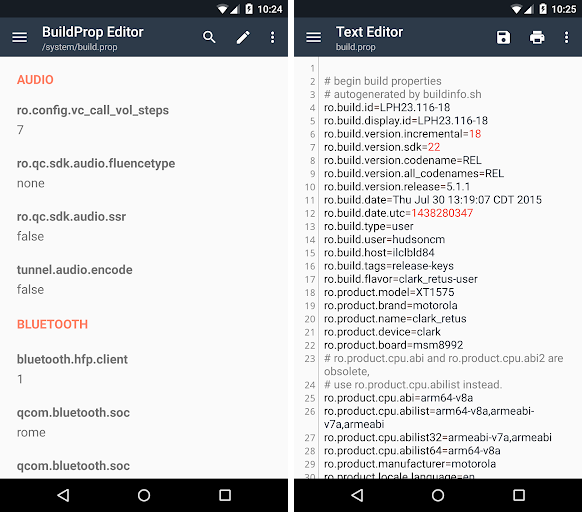
You usually get a few options when saving, like Save,** Save as** and, Save and Exit. Choose wisely depending on what you are testing. After that,
- You must reboot.
Changes do not apply until the device restarts. No reboot, no magic. That reboot moment is always a little tense, not gonna lie 😬 But when it boots fine, it feels elite.
A small reality check though
Editing build.prop is powerful, but it is also easy to mess up. This is not something I recommend if you are unsure what a property does. Copying random tweaks from old XDA threads is how people brick phones and then cry on Reddit.
If you are confident, patient, and backed up, it can be a fun way to learn how Android actually works under the hood. If not, maybe just read the values, learn a bit, and leave the editing for another day.
Final thoughts
Android is already pretty solid out of the box. Tweaking is optional, not mandatory.
At the end of the day, build.prop editing is less about flexing and more about understanding your device. Once you see how much is controlled by simple text values, Android feels way less mysterious and way more approachable.
And yeah, that knowledge hits different 😌🔥