Hack Restrictions Passcode in iOS using Online Cracker
If you landed on this page, chances are you forgot your iOS Restrictions passcode and now your iPhone is acting all high and mighty. Been there, done that, instant regret. No stress though, I’ve got you.
Before anyone gets too excited, quick real talk first. Restrictions, aka Screen Time or Parental Controls, exist for a reason. They’re meant to lock down stuff like YouTube, explicit music, app installs, and random chaos kids or curious mates can cause. It’s protected by a four digit PIN, and once that PIN is gone from your brain, iOS does not play nice 😅
What the Restrictions passcode actually does
Apple calls it Restrictions or Parental Controls, but basically it’s a gatekeeper.
It can:
- Block apps you don’t want opened
- Hide content with explicit lyrics
- Stop purchases, installs, and deletions
- Lock system level features
Once it’s set, you can’t change a thing without that passcode. Zero wiggle room.
The harsh truth when you forget it
If you’ve forgotten the Restrictions passcode, iOS won’t magically remind you. Apple doesn’t store it in a way they can just tell you either. Painful, I know.
The official and safe way to reset it involves restoring your device. And yeah, that sounds scary, but it’s the cleanest route without doing anything sketchy.
The correct and legal way to reset it
Here’s the chill, no drama approach 👇
- Use a computer with Windows or macOS
- Install iTunes or Finder (depending on your OS)
- Take a fresh backup of your iPhone
- Restore the device using your computer
- When prompted, do not restore from an old backup
That last bit is important. Restoring from an old backup can bring the forgotten passcode straight back, like a bad ex turning up uninvited.
Once restored, you can set up your iPhone as new or restore selectively, and then create a brand-new Restrictions passcode that you’ll actually remember this time. Maybe don’t make it 1234, just saying 😬
A quick warning, please read this 👇⚠️
Messing around with random tools, cracked software, or shady websites that promise to “hack” or “crack” iOS passcodes can seriously mess up your backup or brick your device. If you’re not 100 percent sure what you’re doing, don’t wing it.
I know the temptation is real, especially when Google throws wild solutions at you. But trust me, nuking your backup or breaking your phone is not the vibe.
Prerequisites
- A computer with Windows or OSX
- iTunes must be installed in it
- Download and Install iBackupBot according to your OS.
If iBackupBot asking for registration then simply click on Cancel. Or you can also buy iBackupBot’s full version.
Take a fresh, unencrypted backup first
The very first thing is, we need to do is to take a fresh backup first that is unencrypted. So, why fresh backup? Because, old backup may have different restrictions passcode, and it maybe encrypted. The other thing is that if this process isn’t done correctly then you may damage your backup so taking a fresh backup will not cause any problem at all.
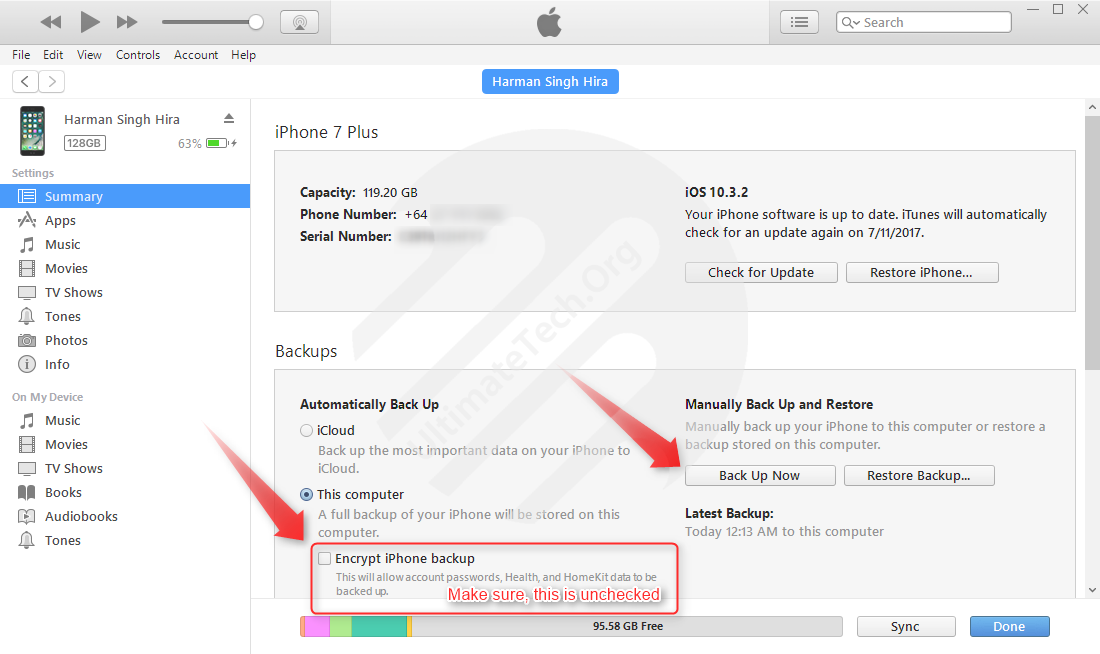
Here’s how to do it, easy as:
- Plug your iPhone into your computer using a USB cable
- Open up iTunes
- From the left side, go to Summary
- Make sure Encrypt iPhone backup is unchecked (super important)
- Smash that Back Up Now button and chill for a bit ☕
Once that’s done, you’re sorted and ready for the next steps. Don’t rush this part, future you will be grateful 🙌
Access Encrypted Keys of Passcode
I hope that you already download and installed iBackupBot in your machine, or if not then do it. After that, go through following steps below:
#1: Open iBackupBot and select latest backup.
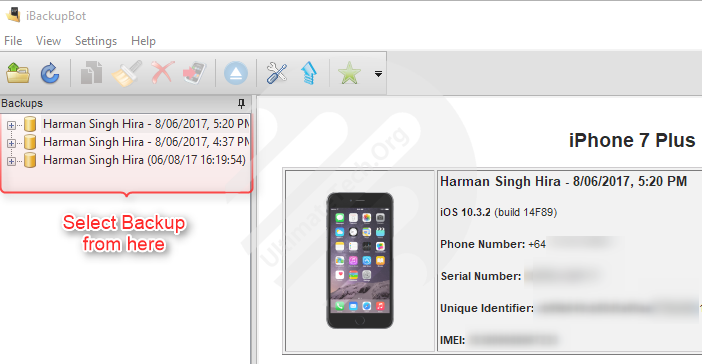
#2: Click on System Files and then HomeDomain
#3: Click on Preference
#4: Search for com.apple.restrictionspassword.plist in the search box
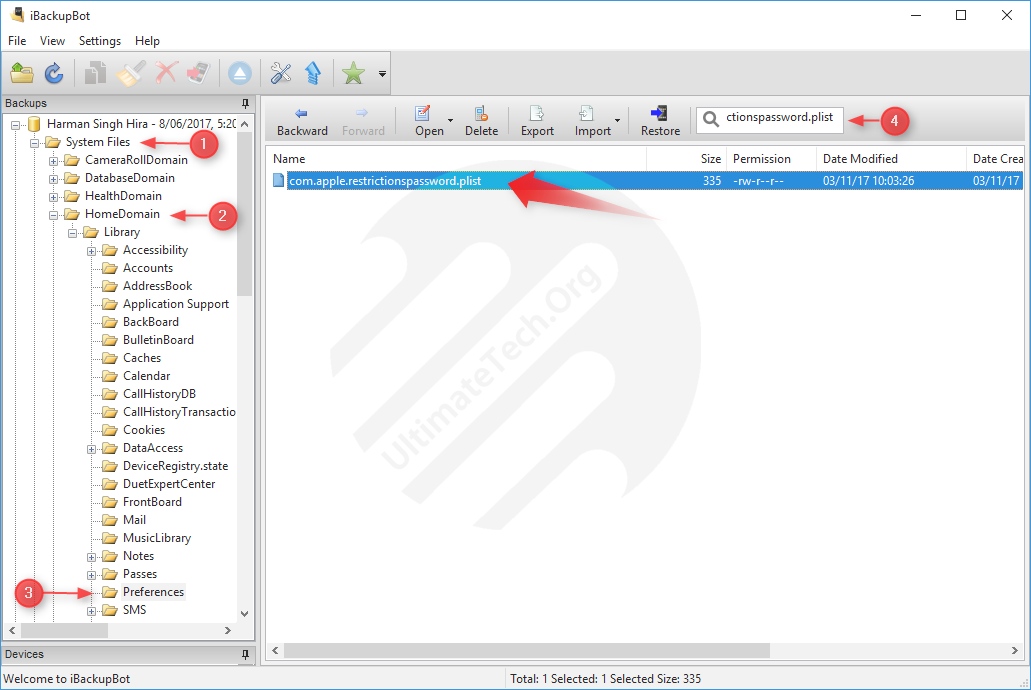
#5: Right click on it and open with Built-it Editor
#6: Copy “RestrictionsPasswordKey” and “RestrictionsPasswordSalt” somewhere
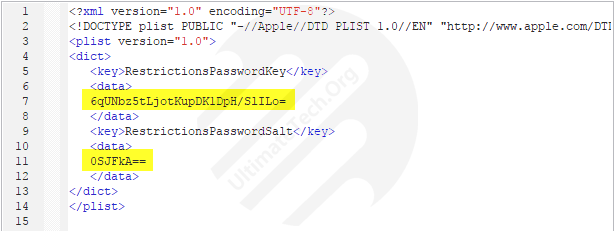
Do not modify any file. Just copy keys and close the editor.
Cracking Passcode
Now, you have keys for passcode but those are encrypted so we have to crack them. Just hit the button below to go on a site that will help you to crack it.
Online Cracker (http://ios7hash.derson.us/)
TIPIf you completely don’t know the passcode then open above link in 10 tabs. In first tab, put the starting value 0000 & last value 1111 and hit search. In second tab, put 1111 to 2222 and search it. And, so on.
My honest take
Apple’s restrictions system is annoying when you forget the code, but it’s solid by design. That’s kind of the point. If there was an easy bypass, it wouldn’t protect anyone.
So yeah, restoring feels extra, but it’s the safest way that keeps you on the right side of things. No dodgy tools, no panic, no “why is my phone stuck in a boot loop” moments.
If you’re setting a new passcode after this, do future you a favour. Write it down somewhere safe, use iCloud Keychain, or store it in a password manager. Your sanity will thank you 🙏
Anyway, hope this helped. If you’re reading this at 2am while staring at your locked settings screen, kia kaha, you’ve got this 😌📱